
Posted on Jun 9
I'm Keshav, a solo developer from India building under my studio SezRonix.
I started keeping a digital journal and noticed something uncomfortable — I was editing myself. Writing around difficult thoughts instead of through them. Eventually I understood why: my entries were sitting on a server I didn't control, in a form someone could technically read.
So I built RozVibe. A private encrypted journaling app for Android.
Since dev.to has been kind to my previous posts on searching encrypted data and the hardest parts of building this, I want to do a complete technical breakdown here — not marketing, just the actual implementation with the real trade-offs.
The core design goal
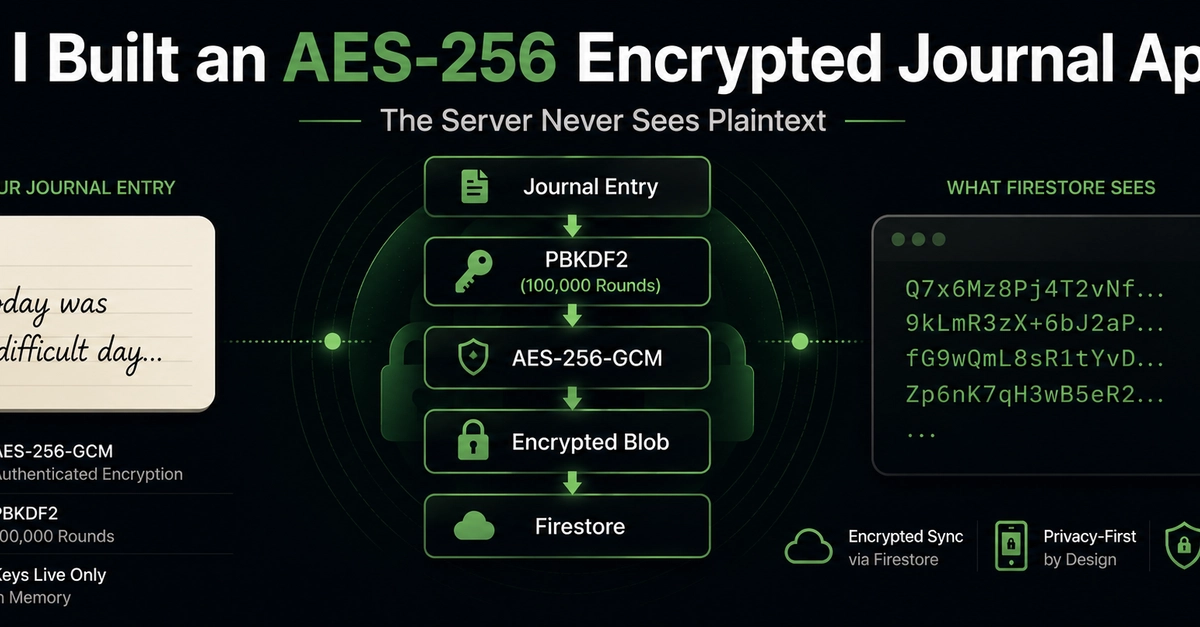
Every sensitive piece of a journal entry — the text content, mood, timestamps — is encrypted on the user's device before it leaves the app. What Firestore receives is a single opaque base64 string. The server never sees plaintext. Ever.
How the encryption key works
This is the most important part to understand correctly, so I'll be precise.
The key never persists anywhere
The 32-byte AES key lives exclusively in RAM inside the EncryptionService class as _key of type encrypt_pkg.Key. It is never written to Firestore, never written to disk, never saved to SharedPreferences. It exists only while the user is actively logged in.
On logout:
void clear() {
  _key = null; // immediately wiped from memory
}
Gone. No trace of it on the device after logout.
Key derivation — PBKDF2 with HMAC-SHA-256
Since the key is never stored, it must be reconstructed on every login. This is done using PBKDF2 — a deterministic key derivation function. Same inputs always produce the same output.
final pbkdf2 = PBKDF2KeyDerivator(HMac(SHA256Digest(), 64));
pbkdf2.init(Pbkdf2Parameters(salt, 100000, 44));
final keyBytes = pbkdf2.process(
  utf8.encode('${userId}_${pin ?? "default_secure_vault"}')
);
100,000 iterations of HMAC-SHA-256. This is computationally expensive by design — it makes brute-force attacks against the PIN significantly slower.
The 44-byte output is split:
- Bytes 0–31 → the 32-byte AES-256 key
- Bytes 32–43 → legacy fallback IV (kept for backward compatibility)
The three inputs required to derive the key
- The user's account ID (
userId) - The user's PIN or password
- A 16-byte cryptographically random salt
Lose any one of these three and you cannot derive the key.
The salt — the only persisted cryptographic material
When a user first signs up, a 16-byte random salt is generated:
encrypt_pkg.IV.fromSecureRandom(16)
This salt is stored in two places:
-
Locally: Android's
EncryptedSharedPreferences(backed by the hardware Keystore) -
Firestore:
users/$userId/crypto_salt
The Firestore copy is what enables multi-device sync — more on that below.
Per-entry encryption
Every single encryption event generates a fresh 12-byte IV:
final iv = encrypt_pkg.IV.fromSecureRandom(12);
Never reused. Never predictable.
The cipher is AES-256-GCM. GCM mode gives both confidentiality and integrity — any tampering with the stored ciphertext is detectable on decryption. The final stored format is:
Base64( IV[12 bytes] + Ciphertext + GCM Auth Tag )
What Firestore actually receives
This is where the design becomes concrete. Inside DiaryEntry.toEncryptedMap(), all sensitive fields are bundled into a JSON object and encrypted before the document is written:
// sensitive fields bundled and encrypted
final encryptedData = encryptionService.encryptData({
  'content': content,       // journal text
  'mood': mood,             // emotional state
  'createdAt': createdAt.toIso8601String(),
  'updatedAt': updatedAt.toIso8601String(),
});

// what gets written to Firestore
{
  'id': id,              // non-identifying UUID
  'userId': userId,      // for security rules
  'date_index': dateIndex, // for sorting queries
  'isFavorite': isFavorite, // for filtering
  'data': encryptedData, // opaque base64 — everything else
}
Only the minimum unencrypted metadata needed for Firestore queries exists in plaintext. Everything a user actually wrote is inside that single data field — unreadable without the key.
A Firestore breach exposes four non-sensitive fields and one encrypted blob. Nothing readable.
How multi-device sync works
This is the question I get most often: if the key never persists, how do entries appear on a different device when you log in?
The answer is deterministic key reconstruction, not key retrieval.
Here's the exact flow when you log into a new device:
-
AuthServicecallsinitializeEncryptionForUser - The app fetches
users/$userId/crypto_saltfrom Firestore - PBKDF2 runs with:
userId+PIN+fetched_salt - Because PBKDF2 is deterministic, the same inputs produce the exact same 32-byte key on the new device's CPU
- That key decrypts all the
datafields from Firestore
The key is never transmitted. It is never stored on the new device until login. It is mathematically reconstructed from credentials the user already knows plus a salt that was synced to Firestore. The moment the user logs out, it's wiped from RAM again.
Client-side search
Firestore cannot search encrypted content — you can't run a where query against a ciphertext field. So search runs entirely client-side.
The actual implementation in DiaryService.searchEntries:
Stream<List<DiaryEntry>> searchEntries(String userId, String query) {
  return getEntries(userId).map((entries) {
    return entries.where((entry) {
      return entry.content
        .toLowerCase()
        .contains(query.toLowerCase());
    }).toList();
  });
}
Flow:
- Fetch all entries from Firestore (encrypted blobs)
- Decrypt each entry client-side using
fromEncryptedMap - Filter the decrypted list in memory by case-insensitive substring match
- Return matching entries
The search query itself never leaves the device. No server ever sees what the user is searching for.
Known limitation: this approach decrypts the entire entry list in memory on every search.
At current scale, that's perfectly acceptable. But as a journal grows into thousands of entries, this becomes increasingly expensive. Every search requires decrypting the vault, iterating through every entry, and performing string matching in memory.
This isn't unique to RozVibe.
Many encrypted note-taking and journaling systems face the same fundamental problem:
If the server can't read your data, it can't build a traditional search index.
That means developers usually end up choosing one of two compromises:
- Server-side indexing (fast search, weaker privacy)
- Full client-side scanning (strong privacy, slower search)
I wanted a third option.
The Blind Index Architecture
The next RozVibe update replaces full-vault scanning with a local blind index.
When a journal entry is saved:
final tokens = SearchTokenizer.extractWords(content);

for (final token in tokens) {
  final hash = HMAC_SHA256(searchKey, token);
  blindIndex.insert(hash, entryId);
}
Instead of storing plaintext words, the app stores HMAC-SHA256 hashes of those words inside a local SQLite database.
A simplified record looks like:
token_hash  →  entry_id

8f2ab4...   →  entry_123
91dfe7...   →  entry_456
The plaintext word itself never enters SQLite.
Only the cryptographic hash.
An index is applied to the token_hash column, allowing SQLite to perform extremely fast lookups.
When a user searches for:
anxiety
the search flow becomes:
"anxiety"
      ↓
HMAC-SHA256(searchKey)
      ↓
Lookup token_hash in SQLite
      ↓
Return matching entry IDs
      ↓
Decrypt only those entries
Instead of decrypting every journal entry, the application decrypts only the entries that actually match.
Recovering The Index On A New Device
One challenge with local indexing is device migration.
The SQLite database isn't synchronized through Firestore.
So what happens when a user logs into a new phone?
RozVibe performs a one-time backfill process.
The application:
- Downloads encrypted entries from Firestore
- Reconstructs the encryption and search keys
- Decrypts each entry locally
- Generates blind-index hashes
- Rebuilds the SQLite database
A simplified version looks like:
for (final doc in encryptedEntries) {
  final entry = decrypt(doc);
  final tokens = tokenize(entry.content);
  await index.insert(tokens, entry.id);
}
Once complete, future searches become local database lookups.
The search query never leaves the device.
The journal content never leaves the device.
And the server still has no searchable view of user data.
That trade-off is important to me.
Fast search is easy when the server can read everything.
Building fast search while keeping the server blind is a much more interesting engineering problem.
The trade-off I made consciously
Storing the salt in Firestore means someone with both Firebase admin access AND the user's PIN could derive their key.
I made this trade-off deliberately. The alternative — requiring users to manually export and store their own cryptographic key — is theoretically purer but practically means users lose their journals when they change phones. The UX failure rate on manual key backup is extremely high for a consumer app.
I chose recoverability over theoretical zero-knowledge purity. I think it was the right call for this use case. I'm open to being wrong.
What the app does beyond encryption
The encryption is infrastructure. The actual product:
- Mood tracking: 5 states — Radiant, Calm, Neutral, Low, Stormy — selected per entry
- Insights dashboard: 30-day mood trend chart, frequency histogram, distribution pie chart — all computed on-device using fl_chart
- Sanctuary Lock: 4-digit PIN screen gating app access on every open
- Rich text editor: flutter_quill for formatted journaling
- Writing streak tracker: consecutive day counter
- Journaling prompts: guided starting points for blank-page anxiety
- Offline support: Firebase's offline persistence cache — works without internet
Full tech stack
| Layer | Technology |
|---|---|
| Framework | Flutter (Dart, SDK ≥3.3.0) |
| State management | Riverpod + riverpod_generator |
| Auth | Firebase Authentication |
| Database | Cloud Firestore |
| Encryption | pointycastle (PBKDF2), encrypt (AES-256-GCM) |
| Secure storage | flutter_secure_storage (encryptedSharedPreferences:true) |
| Charts | fl_chart |
| Rich text | flutter_quill |
| Calendar | table_calendar |
What I'd do differently
1. Explore password-based salt derivation
Rather than storing the salt in Firestore at all, derive it deterministically from the password itself using a separate KDF. Eliminates the Firestore salt dependency entirely at the cost of making salt rotation impossible.
2. Open source the encryption layer
The EncryptionService specifically would benefit from public audit. It hasn't happened yet. It should.
Download
If you're curious about how these ideas translate into a real product, RozVibe is available to try.
Free on Android via Uptodown — no Play Store required:
https://rozvibe.en.uptodown.com/android
Website: https://rozvibe.me
I read every comment personally. If you see something wrong in the implementation — especially in the key derivation or GCM usage — I genuinely want to know. This is my first app at this scale and the security community here is more qualified than I am to spot problems.
— Keshav
Top comments (0)
For further actions, you may consider blocking this person and/or reporting abuse